Reseting user's passwords from the admin site
Add a reset-password button in Django Admin to send password reset links to users.
Days ago I was building a website using Django, and one of the requirements was that admins should be able to reset any user’s password through the admin interface.
You already can change any user’s password, but what I wanted was different. I wanted to send an email to the user saying something like:
You can reset the password of your username visiting the below link:
http://www.example.com/password/reset/<token_here>
I was trying to find an app or snippet that already does that, but I couldn’t find one. After a few minutes, here is what I got:
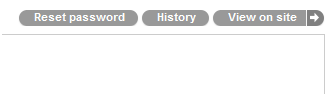
Once admin clicks on the Reset password button, an email will be sent to that current user.
The steps are simple.
1) Create a custom ModelAdmin
Create an admin.py file inside your app directory:
from django.contrib.auth.forms import PasswordResetForm
from django.contrib.auth.admin import UserAdmin

class CustomUserAdmin(UserAdmin):
    ...

    def reset_password(self, request, user_id):
        if not self.has_change_permission(request):
            raise PermissionDenied

        user = get_object_or_404(self.model, pk=user_id)
        form = PasswordResetForm(data={'email': user.email})
        form.is_valid()
        form.save(email_template_name='my_template.html')
        return HttpResponseRedirect('..')

    def get_urls(self):
        urls = super(UserAdmin, self).get_urls()
        my_urls = patterns('',
            (r'^(\d+)/reset-password/$',
             self.admin_site.admin_view(self.reset_password)
            ),
        )
        return my_urls + urls
2) Override the template to add the Reset password link
Assuming your TEMPLATE_DIRS points to templates/, create templates/admin/auth/user/change_form.html:
{% extends "admin/change_form.html" %}
{% load i18n %}
{% block object-tools %}
  {% if change %}{% if not is_popup %}
    <ul class="object-tools">
      <li><a href="reset-password/" class="historylink">Reset password</a></li>
      <li><a href="history/" class="historylink">{% trans "History" %}</a></li>
      {% if has_absolute_url %}
        <li>
          <a href="../../../r/{{ content_type_id }}/{{ object_id }}/" class="viewsitelink">
            {% trans "View on site" %}
          </a>
        </li>
      {% endif %}
    </ul>
  {% endif %}{% endif %}
{% endblock %}
3) Register your custom admin
from django.contrib.auth.models import User

admin.site.unregister(User)
admin.site.register(User, CustomUserAdmin)
That’s it. Then you can go to any user and click Reset password to send that email.